What is a ThemeRiver?
A ThemeRiver (opens in a new tab) is a visualization of thematic variations over time in a set of documents. Documents are grouped into themes based on the terms they contain.
In a ThemeRiver visualization, themes are represented as colored ribbons that flow from left to right. The x-axis represents time, and a ribbon's thickness reflects the number of papers containing that theme in a given year. When individual themes are stacked on top of each other, the visualization resembles a river, hence the name.
The MIDAS ThemeRiver Visualization
To view the visualization, click on the Visualization tab above.
Visualization
The MIDAS ThemeRiver is an interactive display that allows users to explore the themes of MIDAS papers over time. Specifically, the display shows the 20 most frequently occurring themes in infectious disease papers authored by MIDAS members from 2013 to 2025.
The display is composed of four parts:
1. The ThemeRiver
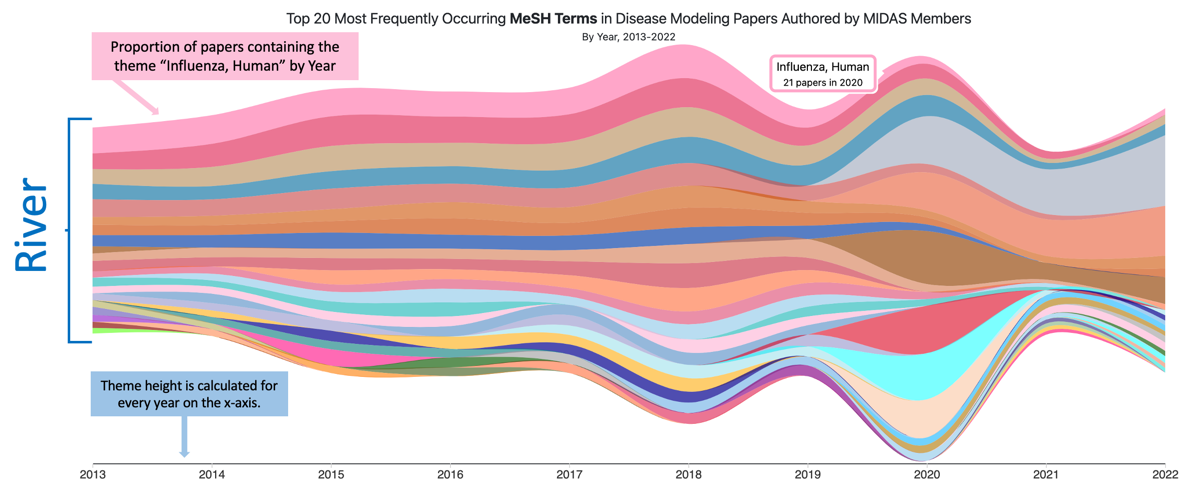
- Hovering over a theme shows a tooltip with the theme name and the number of papers containing the theme in that year. The year is determined by the pointer's position over the x-axis.
- Clicking on a theme displays a list of papers that contain the theme in the year.
2. Options
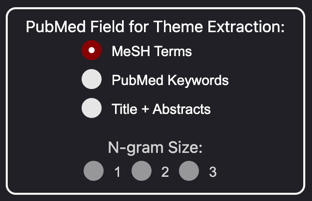
- Field - The PubMed metadata field to use for theme extraction.
- N-gram Size - The size of the n-grams to use for theme extraction. For example, a value of 2 will extract bigrams (two-word phrases).
3. Paper Listing
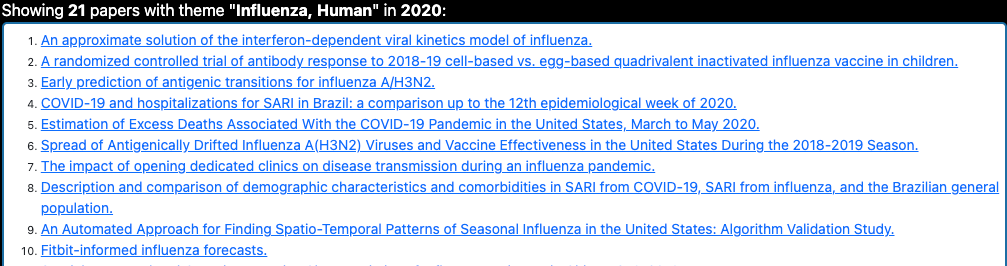
- Hovering over a paper displays the paper title and abstract.
- Clicking a paper takes you to the paper on midasnetwork.us.
4. Theme Listing
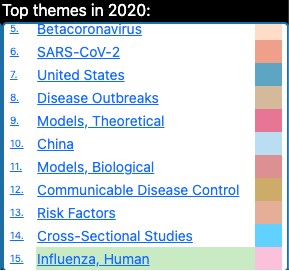
- Clicking on a theme name will highlight the theme in the visualization and load the papers for that theme in the Papers section.
Theme Extraction
Data Source
The MIDAS Members Database (MMD) is the data source for this visualization. The MMD is a publicly available curated database of academic information about each MIDAS member. The academic information includes metadata for publications and grants, areas of interest, associated institutions, and other information. The database is maintained by the MIDAS Coordination Center. More information on the MIDAS Members Database is coming soon.
The metadata for publications is extracted from PubMed using the Entrez API. A description of the API can be found here. The API returns a JSON object containing metadata for each paper. Of the metadata returned, only a subset is used for theme extraction.
The following metadata fields are used for theme extraction:
- Publication Date
- MeSH Terms (a list of curated terms from a controlled vocabulary, assigned by PubMed)
- Keywords (an author-provided list of search terms applicable to the paper)
- Paper Title and Abstract
Metadata Processing
Themes are extracted from the metadata using a custom NLP pipeline. The pipeline is not yet available for public use, but will be in the future. The pipeline performs the following steps:
- Stemming - the pipeline reduces words to their root form (e.g. "infectious" becomes "infecti")
- Lowercasing - the pipeline converts all words to lowercase
- Tokenization - the pipeline splits the text into n-grams (word phrases, where n is the size of the phrase specified by the user) and removes punctuation
- Stop Word & Other Common Word Removal - the pipeline removes stop words (words that are common in the English language, but don't add meaning to the text, such as "the" and "and"). Additionally, other commonly used words that occur in MIDAS papers are removed to ensure that the extracted themes are informative. That is, words like "model," "data," and "infectious" occur in almost every MIDAS paper, so it's not informative to include them in the theme extraction. Defining this list of words to remove was a manual, iterative process.
- Theme Frequency Calculation - the pipeline counts the number of times each theme occurs in each paper per year.
The pipeline is under active development. The planned future improvements are:
- Adding a Paraphrasing step - the pipeline will use a paraphrasing model to replace words with their synonyms. This will allow the pipeline to capture themes that are semantically similar, but not identical. For example, "SARS-CoV-2" (the official name of the virus) and "COVID-19" will be captured as the same theme.
Ideas for improvement are welcome. Please email questions@midasnetwork.us with any suggestions.
Hover a band for yearly counts; click it or a theme in the list to see papers.
Please select a PubMed field for theme extraction.
Top 20 Most Frequently Occurring in Disease Modeling Papers Authored by MIDAS Members
Single MeSH concepts do not use phrase length.
Stacked area chart of the top themes over time. Full data is available in the table below.
ThemeRiver data table
Abstract: